
Product Overview
Telemetry & Intelligence
for Power BI
Know which reports drive decisions, which ones get ignored, and where your BI investment actually pays off.
Free 14-day trial · No credit card needed
How it works
Three steps to actionable insights
Add Pixies to your reports
BI Pixie scans your Power BI Reports and Semantic Models and adds invisible, native Power BI elements (Pixies) that track usage and engagement of your end-users.
Users interact normally
As users open, click, filter, and explore your reports, BI Pixie captures every interaction silently in the background. No matter where you publish the reports.
Analyze in the Dashboard
BI Pixie Analytics is a Power BI App that analyzes and visualizes the vast data that you collect from your Power BI portfolio with BI Pixie.
See it in action
Watch the BI Pixie demo
A short walkthrough: add invisible tracking Pixies to your Power BI reports, then analyze adoption, engagement, user satisfaction, and RLS in the BI Pixie Dashboard.
Trusted by Power BI Teams Worldwide

Built by DataChant Consulting · Microsoft ISV Partner · Leading Publisher of Power BI Apps

Key Features
Everything you need to understand your Power BI audience
Go beyond native Power BI usage metrics. Track what matters for report optimization, governance, and ROI.
Measure ROI
Measure the ROI of your BI investment through the lens of user adoption, engagement, CSAT and NPS scores.
Zero Deployment
Nothing to deploy. Sign up, connect your Power BI workspace, and start tracking in minutes. We handle the infrastructure.
Your Data, Your Control
Your data is stored in a dedicated, isolated container. Encrypted at rest and in transit. Self-service deletion and configurable retention for GDPR compliance.
Beyond Page Views
The only solution that tracks engagement and interactions, not only page views. Achieved through invisible pixel-tracking elements native to Power BI.
Enterprise Scale
Built for large organizations. Assign licenses to business units for chargeback to cost centers, with dedicated isolated storage per team. Scale effortlessly as your Power BI portfolio grows.
Adoption & Attrition Metrics
Measure user adoption and attrition like a pro with dozens of KPIs and time-intelligence metrics.
User Satisfaction
Automatically add feedback controls (Thumbs-up/down or Smile/frown) and embedded survey to measure user satisfaction.
Design Impact
Rank the designs of reports by complexity, usability and passivity and analyze their impact on user engagement & satisfaction
Security & Data Governance
Audit row-level security misconfigurations and track user activity across reports. Detect data access anomalies and ensure compliance with your organization's data governance policies.
Under the Hood
What are Pixies?
Pixies are pairs of pixel-sized table visuals and hidden DAX measures added to each page of your Power BI reports. They are completely invisible to end users and use only native Power BI elements. No code injection, no custom visuals, no browser extensions.
Connect your workspace
Sign in with your Power BI account and select which reports to track.
Read report definitions
BI Pixie downloads the structural definition of your reports via the Fabric API. Your data is never accessed.
Add Pixies
Tiny table visuals with hidden DAX measures are added to each page. Each measure generates a dynamic URL that captures interactions.
Upload and track
The modified report is uploaded back to your workspace. From that moment, every user interaction is captured silently. You can also download the report and publish it yourself.
Architecture
How BI Pixie fits your stack
BI Pixie works with the Power BI you already have, and Microsoft Fabric is optional. Start on Power BI Pro or PPU today. If you run Fabric, BI Pixie lights up extra data, AI, and agent capabilities natively inside your own workspace.
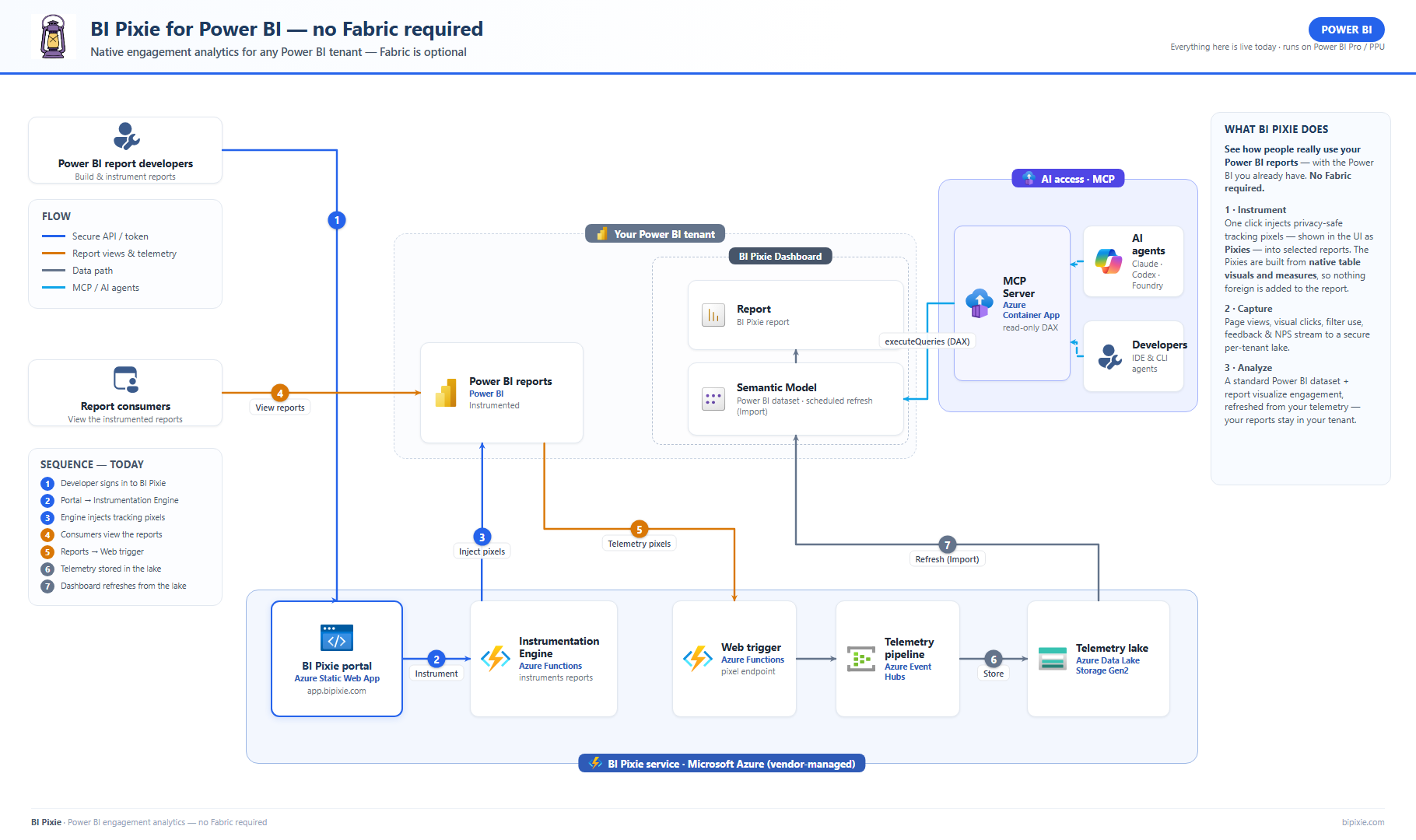
No Fabric anywhere in the picture. BI Pixie's cloud service instruments your reports and captures engagement telemetry; the BI Pixie Dashboard is an ordinary Power BI dataset and report that refreshes from your data, all inside your own tenant.
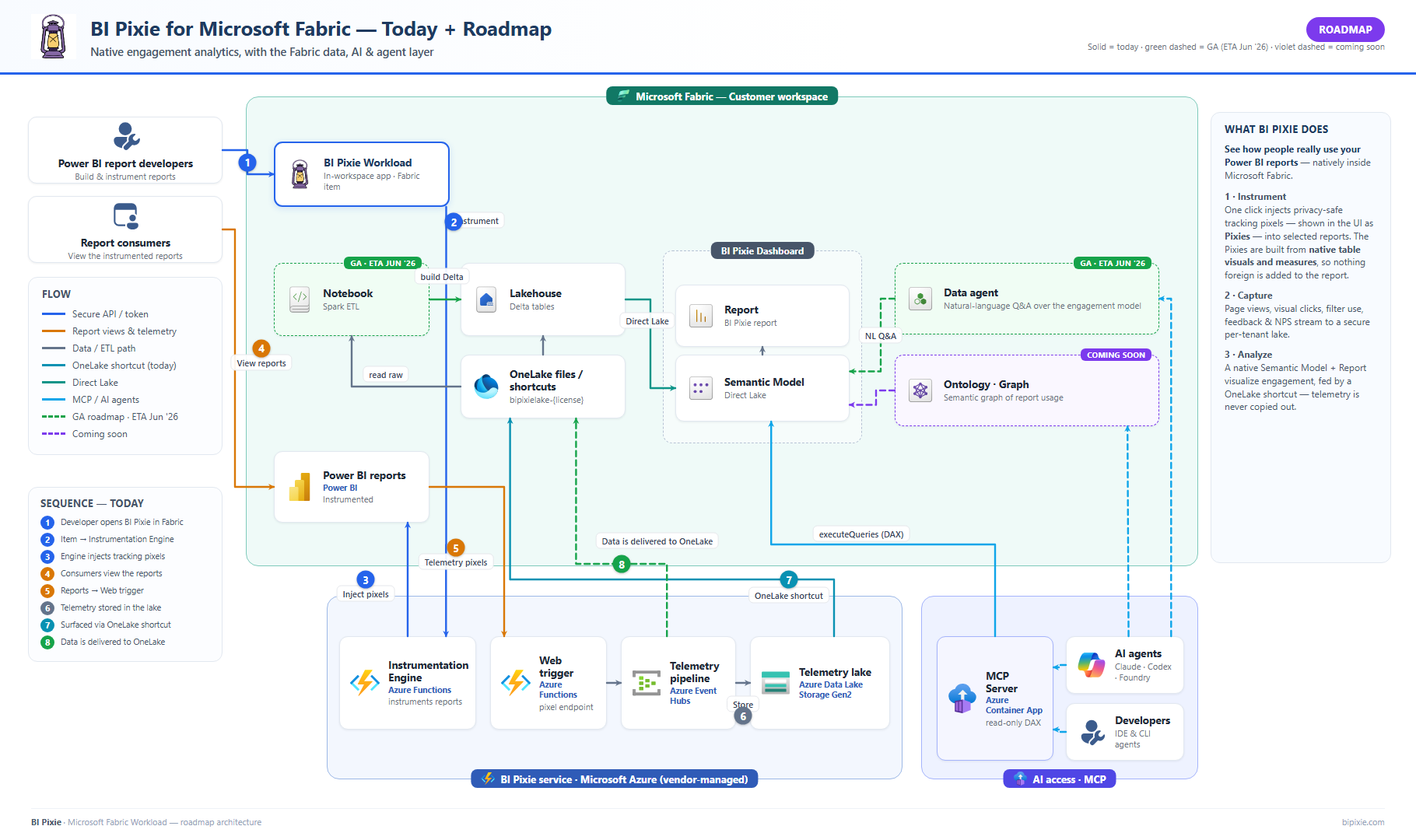
Not sure which fits? Compare all deployments →
Data residency
Where your data lives is your choice
You own your telemetry in every option. Start with zero setup on BI Pixie's storage, or keep your data entirely in your own environment to meet data-residency and sovereignty requirements.
BI Pixie storage
Default · all plans
A dedicated, RBAC-isolated Azure container, just for you. We automatically place it in the region closest to your Power BI home, with nothing to configure, and no other customer can touch it.
OneLake delivery
Microsoft Fabric
Running BI Pixie inside Fabric? Have events delivered straight to your own Microsoft OneLake lakehouse. Your telemetry stays in your Fabric tenant; we never retain it in our cloud.
How OneLake delivery works →Bring Your Own Storage (BYOS)
Enterprise
Keep telemetry entirely in your own Azure Data Lake Storage; BI Pixie never stores it. You run BI Pixie on Azure (BI Pixie's self-hosted edition), so events land directly in your account, and you optionally grant scoped, revocable read access for the in-product Data Management tools.
About BYOS →Compare the options in the Data Residency guide. How we process your telemetry in each is set out in our Data Processing Agreement.
Tracking
Tracked Activities
Power BI Usage Metrics only tracks page views. BI Pixie goes further, capturing the full range of user interactions across your reports:
| Activity | Without BI Pixie | With BI Pixie |
|---|---|---|
| Page views | ||
| Clicks on bookmarks | ||
| Clicks on slicers | ||
| Changes in filters | ||
| Clicks on buttons | ||
| Clicks on images | ||
| Clicks on shapes | ||
| Clicks on hyperlinks in tables | ||
| Drill-through actions | ||
| Tooltips views | ||
| Slicing and dicing in visuals | ||
| What data users select in visuals | ||
| User feedback (thumbs up/down, smile/frown) | ||
| Built-in surveys | ||
| RLS data leakage detection |
You can turn off activities and collection of fields like email addresses, page names and filtered values.
Security & Privacy
Your data, your control
Every deployment option is secure by default. Your telemetry data is always isolated, encrypted, and under your control.
Isolated Container
Each customer gets a dedicated, isolated storage container. Your data is never mixed with other tenants.
Encrypted Always
All data is encrypted at rest and in transit. TLS 1.2+ for all connections, Azure-managed encryption keys.
Your Identity
Authentication via your Azure AD identity. Managed identity for all service-to-service calls. No shared secrets.
Self-Service Deletion
Delete your data anytime from the portal. Configurable retention periods for GDPR and compliance requirements.
Enterprise Cloud
Dedicated Containers per Business Unit
Assign isolated storage containers to different teams or business units for chargeback and data separation.
Data Sovereignty
Request a dedicated, private environment with isolated compute and storage deployed in the Azure region of your choice.
Dedicated Infrastructure
Your own isolated compute, networking, and storage. Full VNet isolation with private endpoints. No shared resources.
Capabilities
Enterprise-grade features
Full capabilities for each deployment option. Choose what fits your organization.
All Core Tracking
Page views, visual clicks, filter interactions, drill-throughs, tooltips, bookmarks, and slicing/dicing.
User Identity Capture
Track who is using your reports with hashed or full identity (configurable per your privacy needs).
Visual Interaction Heatmaps
See exactly where users click on each report page with interactive heatmaps.
Slicer & Visual Data Tracking
Track what data users select in visuals and slicers for deeper behavioral insights.
Granular Workspace & Report Settings
Configure tracking activities and detail levels per workspace or per report.
Feedback Controls & Surveys
Add thumbs up/down or smile/frown controls and built-in surveys to collect user satisfaction.
Row-Level Security Auditing
Detect RLS misconfigurations and data leakage risks across your report portfolio.
Custom Visual Governance
Monitor certified, uncertified, and unknown custom visuals across your report portfolio.
Configurable Data Retention
Set retention from 7 days to 3 years. Self-service deletion of any user's data for GDPR compliance.
License & Limit Assignment
Assign tracked report limits and session budgets per team member. Per-license data isolation. Perfect for chargeback across multiple business units.
Per-Report Tracking Keys
Rotate tracking keys per report for fine-grained security control.